 breat.fr
How to install Kindroid as an application on desktop
Before all
Of course you can create a shortcut on your desktop but isn't nice, so here a solution, we'll transform the website in a Progressive Web App (PWA).
To do it, you need my Chat page script https://code.breat.fr/k/kindroid/docs/how-to-install-scripts-on-desktop, because Kindroid devs didn't add this small feature, so I did.
What the utility of this?
- Have a shortcut on your desktop
- No need open your browser with many tabs 😊
- Save some space for the website content
I'll lost the theme and scripts?
No, because will be in reality in your browser but with some things removed, like a lite version of your browser.
Unfortunately, all browsers don't support this.=, here a short list of ones i tried:
- Brave > supported
- Chrome > supported
- Edge > supported
- Firefox > not supported by default, so you need install this addon https://addons.mozilla.org/firefox/addon/pwas-for-firefox/ before and follow their instructions after, then you'll can use this part of my script
- Opera > seems opera devs removed this part of chromium so not supported
- Opera GX > seems opera devs removed this part of chromium so not supported
- Safari > I don't know
How to transform the Kindroid website in PWA
After you installed my script, go on https://kindroid.ai/home/.
For Brave / Chrome: search in the address bar this icon and click on him:

if you don't see it, that can happen, look here:

For Edge search in the address bar this icon and click on him:

if you don't see it, that can happen, look here:
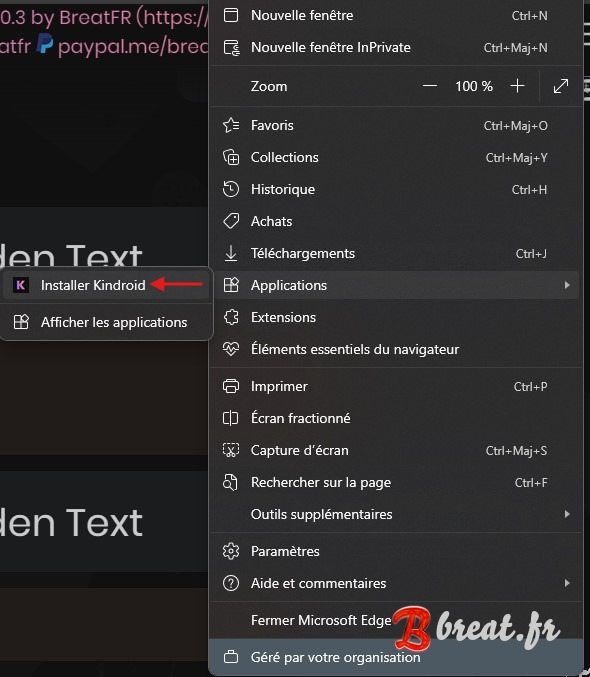
That's all.
Here the result (the red arrow is to show you where to find your browser's plugins):

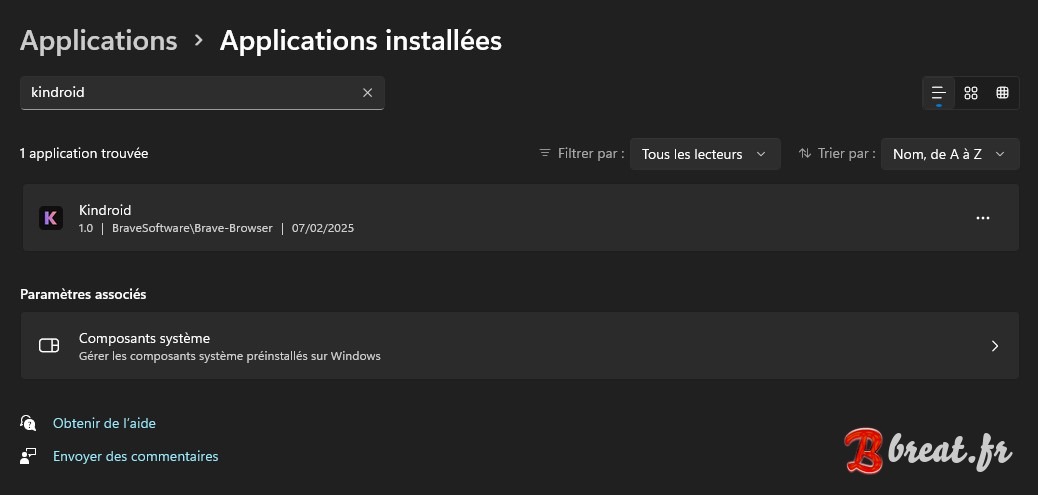
To uninstall it, Right click on start menu > Installed applications > search kindroid > 3 dots:
Do you find this project useful? You can support its development using the buttons in the page footer.